Showing posts with label Tutorials. Show all posts

Filmmaking: How to Give and Take Notes Without Making Enemies

Filmmaking is a collaborative, artistic process involving people with egos and opinions. Just about everyone involved has ownership of some percentage of the final product and, especially if they are not getting paid or are getting paid very little, they are hugely invested in that final product being great or what’s the point for them being involved?

This can be a recipe for disaster in the pre- and post-production world. When you’re on set and in production the collaboration is face-to-face and the roles are defined and visible so it is easier to manage and to detect when something is heading in the wrong direction. In the pre- and post-production world where people communicate much more by email the potential for being misunderstood and for conflicts blowing out of proportion is so much greater. Often times the way we communicate is by asking for ‘notes’ or being given them whether we want them or not from people higher up the food chain.

There are two times we usually ask for and get notes: in script development and in the editing process. Getting notes, considering them and implementing them can make your film project better. It can also be frustrating, infuriating, it can make you very defensive and, if you blindly try to incorporate every note you’re given, it can make your film worse not better.


       Taking Notes

Be gracious when you are given notes especially if you asked for them. Again, this is especially true in the low/no budget filmmaking world. If you ask someone you respect to give you notes they are taking time out of their life to do this as a favor so don’t get dismissive or defensive with them if they say something you don’t agree with or like.

Don’t ask for notes for something you don’t actually want criticism on. If what you really want is a compliment, a pat on the back and an ‘at-ta-boy’ then send it to your mom. If you ask for criticism you will get it. Don’t waste your reviewer’s time asking for notes you have no intention of even considering because you think the piece is already finished.

Take care who you ask notes from. If you’re not the top of the food chain there are some people who you will have to take notes from. Beyond that only ask notes from people whose opinion you respect. When you ask for notes you are asking for criticism and you will usually get it. If you respect the person giving you notes you are much more likely to take their notes more seriously than the notes you’re getting from some faceless executive.

Consider the note givers position, experience and point of view. The notes you get from someone experienced in the process will be very different from the notes you get from someone who has never made a video in their life, however, both can add value. The more experienced filmmaker may see things you are not experienced enough to have noticed. The novice’s opinion may be much more in line with your target audience and so just as useful.

Be respectful of the opinion of those whom you have to ask notes from even if you’re doing it as a formality. Perhaps some backer wants a producer credit and wants to be involved in the process. Dismiss the money man at your peril. They are not just a source of cash; their ownership is just as valid as yours and you’re probably going to want them to back a bigger project in the future. Involve these people. Genuinely consider their notes. Thank them for being involved. Show them why their note might not work. Take the time to cut the section two ways if you have to and really show them why your way works. It behoves you to try to gently educate these people as you go especially if you may be working with them again.

Be specific about what you want notes about and the specific deadline you want them back by. Give people a reasonable but finite time to get back to you. Also, if there are areas you are specifically concerned with tell your note givers so that they can give you notes in that area.

You’re not entitled to notes from someone so ask politely and don’t make demands. This is especially true if you are asking for notes from someone who is not invested in the project but whose opinion you respect.
Try to be as objective as you can; try to leave your ego out of it. This is easier said than done when the project is your baby and you have so much time invested in it. Just remember that notes are not criticism. If some note makes your blood boil take a breath, an hour, a day or a week before crafting a response - never reply in anger.  Once your emotions have settled you may find something of value in these notes that you can still use.

Follow-up on every note. When you send out your next cut let people know what notes you have incorporated. If you haven’t incorporated a note into the cut explain to the note giver why. Always let a note giver know that they have been heard and that you’re not ignoring them. If they feel ignored they can damage your project.

Pick your battles - know when to fold and when to dig in. When someone higher up the food chain than you gives you comments you must address them. If you don’t agree with them know when to fight for what you want and when it is ok to give the reviewer their point. If you fight every note it will only serve to polarize your two positions over everything in the project.


        Giving Notes

If you offer a criticism be sure that it is specific and that you offer a solution to address the problem you see.
Here’s a note I received once “I’m not inspired but that might be because of the annoying music.” How do I address this? The music where? One person’s annoying makes another’s top ten list: of course I’ll be on the defensive if chose or even wrote the music. What do you want me to change it to? I don’t want to waste my time switching out the soundtrack over and over until I stumble on something this note giver likes. Instead give me some guide as how to fix the issue. Imagine the knee-jerk reaction I had to this note and how I had no idea how to address it. Now imagine how much more likely I would be to be able and willing to address your issue if it was phrased like this: “I don’t think the background music fits the chase scene. Can you find something a bit less Techno and a little more Jan Hammer?

Don’t use loaded or emotional language. For example, ‘annoying’, ‘hate’, ‘stupid’ will evoke strong reactions and put the filmmakers on the defensive rather than the collaborative.

Be concise and specific. Don’t use a full paragraph if a few words will do. It’s a waste of your time and the filmmaker’s.

Notes are so much more digestible if you can come up with a couple of positive things to say before you go on to list a whole load of things you see as issues. As the old saying goes, you catch more flies with honey than with vinegar. Even if you think what you just saw or read needs a lot of work it is rarely difficult to find something nice to say. If everything you say is negative your filmmaker will be on the defensive and will find it hard to consider anything you said or your opinion in the future. It’s also worth ending on a positive note too. Filmmaking is all about collaboration and the relationships you make will often continue long after this one project is finished.

Don’t make notes on things that cannot be addressed at this point. If you’re asked to make notes on the edit and this is the first time you’ve seen the project and you hate the script you can’t tell the filmmaker that he has to rewrite or recast the whole thing. He might not even be able to film any pickup shots at this point so try to work with what is there. Suggest edits to mitigate those elements you strongly dislike.

Be polite. Don’t be condescending. Give notes you would want to receive.

Be quick in getting notes back. If you can’t get notes back to the filmmaker inside the deadline or you don’t have time at all it takes less than a minute to send an email explaining why you won’t be able to deliver within the time frame or at all.

If you think the person or project is beyond help don’t burn bridges. Be polite, don’t waste your time and just bow out of the project. It’s a small world. You will meet this person again and you may have to work with them. If you tear this project to shreds that’s what they will remember about you.

Read through or watch the subject once before you make any notes at all. After that first pass write down your general first impressions of the whole work. Also describe and plot or character issues you have that are confusing you. When you go through after the first time you comments can be more granular. Make comments about individual scenes and then page by page or minute by minute.


        Other Links

Skullcandy Hesh Headphones: Refinish

I have a slight headphone fetish. As I'm not encouraged to blast my music anymore I listen to music, write music, produce and edit video all while wearing headphone these days. I don't like in ear buds, I prefer big, over the ear headphones with my favorites being the chunky but beautifully solid and neutral Sennheiser HD 280's. As a result of this obsession I have several pairs of decent over the ear headphones lying around both at home and at work.

When I saw the Skullcandy Hesh Headphones in NBA Cavaliers Colors ridiculously cheap (they're usually $40-50) I couldn't resist. They had a built in iPhone microphone which I thought would be useful but I didn't like their paint job - I don't follow any American sport so I planned to refinish them.

This weekend I finally got chance to do that. Here's the process:

Disassembly:
  • Remove the earphone soft pads - they just pull off
  • Undo the 3 screws hidden under the ear pads
  • Separate the plastic holding the driver from the shell
  • Desolder the wires from the drivers (2 joints per driver) making a careful note of what goes were when we get back to reassembly.
  • Unscrew and remove the detail pieces in the shells (they were gold in my case).
  • Remove the connection cord from the left shell.
  • Carefully expand the c-brackets where the headband meets the shells and prize out the shells
Painting:
  • Using a fine sanding block, remove the existing paint from the exterior of both shells
  • Remove all dust then carefully spray paint the shells using several light coats
  • Let the paint cure at least for 24 hours
  • Using cutting compound, cut back the paint surface.
  • Polish the newly painted shell exteriors.
Assembly
  • Assembly is the reverse of disassembly.
  • Take care when soldering wires back in place.
  • All plastic components are labeled Left or Right somewhere in their molding
  • Take care not to scratch your new paint surface when reattaching the shells to the headband.
  • Drivers can only fit back in the shells one way, with the plastic lump towards the bottom.
  • When refitting the soft pads you can persuade the vinyl edge back into the crack between the shell and drivers with a blunt knife blade.

To complete the de-badging I also unpicked the badges from the fabric covering the headband. There you have it; slightly less obnoxious Skull Candy Hesh headphone but how do they perform?

You can tell the market these headphones are aimed at (not me); the headphones are very bass heavy. But it's not just the the bass is over powering the mids and highs - the mids and highs seem to be completely missing. Construction wise the Hesh plastic is very creaky which does affect your listening experience if you move your head at all while wearing them. Ear seals are far from perfect so they don't exclude as much of the outside world as you think they should. A cheap pair of Senneiser HD 202 headphone's easily out performs the Heshes acoustically. The Hesh headphones don't sound that bad if you haven't just been wearing good quality headphones. I do keep them around specifically for use with the iPhone as the cable fits with the bumper in place, they have an inline microphone and they do sound better than the apple included earphones.

Sony Vegas Movie Studio Platinum: Render Error Still Occurs in v11

Update: Since I wrote this post I upgraded to Movie Studio Platinum 12 - the program has gone 64-bit which seems to answer this problem that we were experiencing in prior versions.

I am a huge fan of Sony Vegas Movie Studio Platinum. For the money (around $100) it is impossible to beat on the Windows platform. However, ever since I started using it 3 versions back it has been plagued by a bug that Sony are either unwilling, or unable to fix.

The problem occurs when you are trying to render HD video out above a certain, unknowable complexity on a 64 bit platform. The error you see when you're trying to render out (just before the application crashes) is "The system is low on memory. You may be able to reduce memory usage by closing other applications." I'm here to tell you it doesn't matter how many programs you close, once you hit the threshold and start seeing this error your video will not render. I am also here to tell you it is not an issue with the amount of memory you have in your machine (unless you have less than 3gb). I have 8gb memory in my Vista 64 bit desktop and 3gb in my Win 7 64 bit laptop and both were plagued by this issue trying to render the same project recently - the project had 6 video tracks and 8 audio, with effects on most clips and tracks but it was only three and a half minutes long.

First an introduction to some boring Windows fundamental architecture. 32bit versions of Windows can only use a maximum of 2gb of memory. 64bit versions are not restricted in the same way which is one reason geeks like 64bit systems. Unfortunately many consumer pieces of software are 32bit. Now, you can run a 32bit program on a 64bit version of Windows but it won't be able to use more than 2gb of memory itself. With me so far?

Sony Vegas Movie Studio Platinum is a 32bit program (Pro is 64bit) which runs well on 64 systems but has had this memory leak issue when rendering in all versions I can see to date. Basically the render process is using as much memory as it can get (2gb) but at some point it doesn't release a part of memory it has reserved - it then tries to get more memory and the crash occurs. Why Sony haven't fixed this issue is infuriating - I was sure they would have it done in version 11 but no; I installed the software and the bug was back.

Luckily for us there is a tried and tested way to address this issue that has been documented for previous versions of Movie Studio and this is my update to those instructions for v11.

  • Close Sony Vegas (if it hasn't already crashed on you.
  • Download and install CFF explorer from www.ntcore.com/exsuite.php.
  • Run CFFExplorer
  • File > Open "C:\Program Files (x86)\Sony\Vegas Movie Studio HD Platinum 11.0\VegasMovieStudioPE110.exe
  • In the left plane of CFF Explorer click NT Headers > File Headers
  • Bottom right of the resulting grid will read "Click here" - click there
  • In the resulting dialog window check "App can handle > 2gb address space" and then click "OK"
  • File > Save As and save the file to a local directory (somewhere in your documents or desktop)
  • Close the file in CFF explorer
  • In Windows file explorer make a copy of the original file you just opened (this is so, if things go wrong, you can get back to where you were)
  • In file explorer move the file you saved in a local directory over the one in the installed directory: whenever you try to copy or move a file in the installed directory Windows will probably ask you exactly what you want to do to try and stop you corrupting installed applications - Click "Move and Replace" and then hit "continue" if it says you need to confirm your administrator privileges. This may seem long winded but you have to get around Windows security that is trying to stop you messing up your system.
  • Repeat the CFF edit for the following files:
    • VegasMovieStudioPE110.exe (you just did this one)
    • vegasmoviestudiope110k.dll
    • all dlls in the FileIO Plug-Ins dirrectory - in my installation this was:
      • ac3studioplug\ac3studioplug.dll
      • aifplug\aifplug.dll
      • atracplug\atracplug.dll
      • aviplug\aviplug.dll
      • compoundplug\
        • compoundplug.dll
        • mc_dec_aac.dll
        • mc_dec_avc.dll
        • mc_enc_mp2v.dll
        • sonyjvtd.dll
        • sonymvd2pro_xp.dll
      • fhgaacplug2\fhgaacplug2.dll
      • flacplug\flacplug.dll
      • gifplug\gifplug.dll
      • lpecplug\lpecplug.dll
      • mcmp4plug2
        • mc_dec_aac.dll
        • mc_dec_avc.dll
        • mc_enc_aac.dll
        • mc_enc_avc.dll
        • mcmp4plug2.dll
      • mcplug2
        • mc_config_mp2m.dll
        • mc_config_mp2v.dll
        • mc_config_mpa.dll
        • mc_dec_dd.dll
        • mc_dec_mp2v.dll
        • mc_dec_mpa.dll
        • mc_demux_mp2.dll
        • mc_demux_mp4.dll
        • mc_demux_mxf.dll
        • mc_enc_mp2sr.dll
        • mc_enc_mp2v.dll
        • mc_enc_mpa.dll
        • mc_enc_pcm.dll
        • mc_mfimport.dll
        • mc_mux_mp2.dll
        • mc_mux_mp4.dll
        • mc_mux_mxf.dll
        • mcplug2.dll
      • mp3plug2\mp3plug2.dll
      • mp4plug3
        • aacaenc.dll
        • mp4plug3.dll
        • savce.dll
        • sgcudme.dll
        • sgocldme.dll
        • sgpuclb.dll
        • sony4vem.dll
      • mvcplug
        • mvcplug.dll
        • sonyjvtd.dll
      • oggplug\oggplug.dll
      • qt7plug\qt7plug.dll
      • rm9plug
        • rm9plug.dll
        • pncrt.dll
      • sfpaplug\sfpaplug.dll
      • stl2plg\stl2plg.dll
      • swfplug\swfplug.dll
      • wavplug\wavplug.dll
      • wicplug\wicplug.dll
      • wmfplug4\wmfplug4.dll
This fixed the crashes while rendering for me and I hope it works for you but if you're not comfortable messing around with dll files please be careful - you could do more harm than good .If you can't see the dll files of the folders they are in you may need to make hidden files visible. All the dlls in the file IO directory that I listed may seem like overkill but I just wanted to never face this error again ... until the next time when Sony release v12 and I've forgotten all about this pain. Then again, Sony might actually get its act together and fix this issue for us ... fat chance :)

Windows 7 Sound Issue: Unwanted Reverb Stuck On

I had a strange problem with my little, Dell laptop (Inspiron 1318) the other day. I thought I'd put the issue and solution out there just in case anyone else encounters it. The issue was as if a reverb effect was stuck on.

I was about to work on a podcast that I edit in Audacity when I noticed that the source audio was dripping in reverb. If you have edited any audio yourself you'll know that you want the audio as dry as possible so that you can choose when and how to apply effects. At first I though the reverb had been added to source audio as it was recorded but then I noticed there was reverb applied to any audio I listened to - YouTube videos, MP3s in my music library, they all came through drenched in horrible reverb. Something was wrong with my machine.

The funny thing is that I wouldn't know how to add blanket reverb to all audio on my machine. I checked my audio driver from Dell and reinstalled it even through it was already up to date.That didn't make any difference.

To get rid of it I had to uninstall the audio driver and then reinstall it from scratch. To do this:

  • "Start" button and select "Computer"
  • Select "System properties" from the top menu bar of the "Computer" window
  • Select "Device Manager" from the left-hand "Control Panel Home"
  • Select "Sound, video, and game controllers" to show your audio device(s)
  • Select the audio device you are currently using then right-click and select "uninstall."
  • Reboot to complete the uninstall.
  • On startup, Windows will detect the sound card and re-install drivers.
  • It may require another reboot but your sound should now be clean
I hope this information is clear and useful to anyone else who encounters this weird problem.

Using The DIY Mini-Rail Dolly


Last time I described how I made a mini-rail dolly. I finally found a little time to take it out into the backyard and try using it. Here's the result followed by a few tips and tricks for using it:


I couldn't find any real instructions on using a slider so here is what I learned after using my home-brew device once (there should be more authoritative voices than mine out there but I can't find them):

  • Have a planned start and stop point for your move and pre-focus accordingly.
  • If you're rolling into a focus point pre-focus with your camera in the final location and use a finger to mark where that position is on the rails - your finger makers a pretty soft stop point.
  • Don't use the end buffer of the rails as your stop point - the way the camera stops is too sudden. 
  • Give yourself 5 seconds with the camera still at both the start and end points of your move to give yourself more options when you come to edit.
  • Start the movement slowly and end slowly - avoid sudden acceleration and braking.
  • Don't move the camera too quickly - you want to induce a feeling of sophistication not motion sickness.
  • It's really hard to move the camera consistently at a very slow speed.
  • Pulling focus on a DSLR while rolling is very hard - avoid if at all possible.
  • When you're trying to get a smooth move you can hold the sled or head but it seemed to work best for me if I held the camera itself.
  • Objects must be close or mid-distance to work effectively with small movements of 5ft and less
  • Keep your tracks, horizon and horizontal lines level - shim the tracks to achieve this and make sure they don't rock part way through the move as the center of gravity changes.
Again, these are just my personal findings. If you know better I'd love to hear from you.


DIY Mini-Rail Dolly

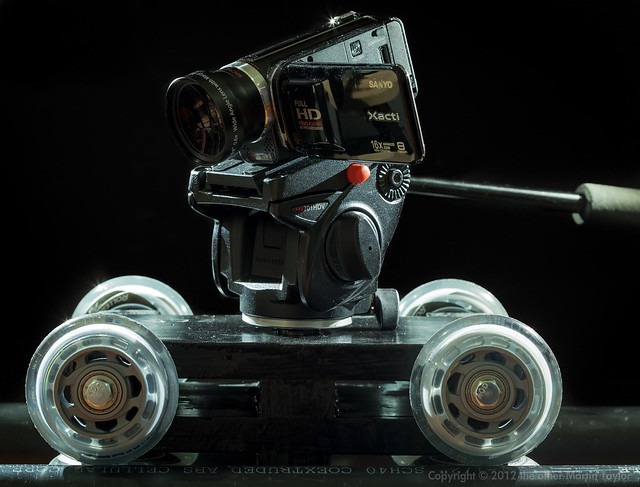
DIY Mini-Skate Wheel Dolly Painted Up
Finished truck sitting on rails
As more and more people get into video the number one accessory they seem to want after a shoulder rig is a slider. A slider allows short trucking camera movements. Commercial sliders run the gamut in price (from several hundred to several thousand) and design. A slider usually has a captive body that you mount a tripod head to. The body runs on a track on mechanical bearings or some low friction material. The tracks seem to run anywhere from 2 to 5 feet and can mount on a tripod themselves or some have feet that allow you to lay the slider on the ground for a low profile shot, or rest it on a convenient table or counter top.

Sliders are popular because camera motions are shorthand for high production values but, because a slider unit is self-contained, setup times are significantly less than a full size camera dolly on rails. Not to be out done I wanted to be able to achieve these kind of shots sometimes but my need wasn't severe enough to justify commercial prices so I went into CAD and then to my toolbox to come up with the following.

This is less a slider than a scaled down version of a floor mounted dolly and rails system. The truck isn't captive so, unlike a slider, you can lift it off the rails. This makes it easy to transport and also allows you to create many different rails configurations for different situations that can utilize a single truck; the following tutorial offers one rail design but you can easily make longer rail systems that this truck can run on.
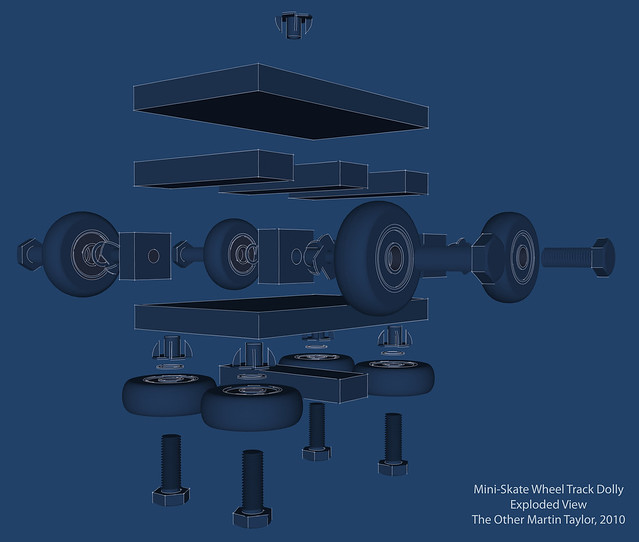
Exploded design view
My design requirements were as follows:
  • to be cheap
  • to accomplish perfectly smooth camera movements silently
  • to be easy to construct with the minimum of tools
  • to be light and compact enough to be transported in my tiny car without having to put the roof down (I have a MX5 / Miata)
  • to be strong and reliable.
Total cost of materials was $50 and consists of the following:
  • PVC & Lumber (actual lumber dimensions are smaller than quoted eg. what is called 1" thick actually measures 0.75"):
    • 6"x1" plank ($5)
    • 2"x1" plank ($1)
    • 1.5" (inside measurement) PVC pipe length ($5)
  • Hardware:
    • 8 x Rollerblade wheels with bearings and spacers ($25 from Amazon)
    • 4 x 5/16", 3" long screws for axles
    • 4 x 5/16", 1.5" long screws for bottom guide wheels
    • 8 x 5/16" washers
    • 8 x 5/16" T-nuts for wheels
    • 3/8" and 1/4" T-nuts for tripod head mount
    • 3/8" and 1/4" screws for tripod head mount
    • Box of 1.25" wood screws (for track construction)
  • Consumables:
    • Wood glue
    • Nails
    • Paint or stain for finishing
    • Wood filler
    • Sanding sheets
Tools required:
  • Miter saw (miter box optional) or power saw that can accomplish same
  • Drill & bits (preferably powered)
  • Hammer
  • Screw driver
  • Pencil & square edge to measure and mark cuts
  • Sanding pad or electrical sander that can accomplish the same.
  • Hacksaw and file or Dremel
Walk Through:
Construction of the truck:
  1. Cut 2 x 9" lengths from your 6x1" board.
     
  2. Cut 4 x 5.5" lengths from your 2x1" lumber
     
  3. Glue and pin together as shown in the illustration
     
  4. Clamp and set aside.
  1. Cut 4 x 1.5" lengths from your 2x1" lumber to use as the axle blocks
     
  2. Glue and pin to the truck body as shown in the illustration
  1. When solid drill 3" long holes in the center of each axle block - they should be deep enough that they can accept the remaining threads of the axle bolts when they have the skate wheels in place.
     
  2. Widen the entrance of these holes to accept the t-nuts
     
  3. Press or hammer t-nuts into place for the axles.
Illustration 3
  1. Mount the 4 main wheels: each has a long bolt, drop on the wheel, then a washer then screw into place - the wheel should be able to spin freely.
     
  2. Using a pipe as your guide estimate where the guide wheels need to be on the bottom of the truck body so that the main wheels run on the top of the tube and the guide wheels keep the truck running true.
     
  3. As you did for the main axles, drill holes for the shorter guide wheel axles, fit t-nuts and mount the guide wheels in place.
     
  4. Find and mark the center of the top of the truck body. This is where you will mount a t-nut of the correct thread (1/4" or 3/8") that your tripod head will mount to. You can see that I put both sizes of t-nuts on my truck so I can mount any tripod head on it. You can do the same or chose the thread you most commonly use. You can also use the smaller 1/4" screw with an adapter to scale it up to 3/8" when required. Mount the t-nut(s) as required.
     
  5. Take a 1/4" or 3/8" bolt appropriate for the t-nut(s) you just fitted and the tripod head you want to use. With a Dremel cut off wheel remove the bolt head. File your cut smooth so that it will easily mount in your t-nut and the base of your tripod head. You can cut a slot in one end of the screw to allow a flat screw driver to get purchase of your headless bolt if required.
Illustration 4

Construction of the rails:
  1. Take your PVC pipe and cut it exactly in the middle to make two identical rails.
     
  2. Cut 3 x 10.75" sleepers from your 6x1" board.
     
  3. Cut 4 x 10.75" sleepers from your 2x1" board.
Illustration 5
  1. Use your completed truck to accurately space your rails. It is important that your rails the right distance apart for your wheels and absolutely parallel. Using your assembled truck to space the rails will ensure you get this bit right.
     
  2. Mount the center 6" wide sleeper to your rails first. At the center of both rails, using the truck to accurately space the rails, drill a pilot hole and screw the sleeper to both rails - use 2 screws each side. A wood screw should cut into the PVC pipe as well through the wood with ease. It helps to have a extra pair of hands when you're trying to hold the rails the right distance apart and drill and mount the sleepers at the same time.
     
  3. Mount the two other 6" wide sleepers about a third of the way down each rail in the same way, again using the truck to ensure the rails remain the right distance apart, screw the sleepers into place.
Illustration 6
  1. Mount 2 of your narrow sleepers between  the 3 wide sleepers - these only need to be mounted with 1 screw per side.
     
  2. Flip the rails over and mount the 2 remaining narrow sleepers at the very end of the top of your rails. These sleepers not only add strength and rigidity to your rail component but they act as a buffer so that your truck with your precious camera on it won't fall off the ends of the rails and crash to the floor
Illustration
Testing and finishing:
  1. Mount a tripod head to your truck with the headless bolt you made.
  2. Put a camera on the tripod head.
  3. Put your rails on the floor with the sleepers on the bottom
  4. Put the truck on the rails and check that the truck runs freely and smoothly on the rails.
  5. If everything works well you can take the tripod head and wheels off your truck and sand and paint it if you want. Everyone seems to like the truck better when it's painted black even though it has little real practical purpose.
You're done and ready to roll! Next time I'll post some demo footage and write some tips on using this system.
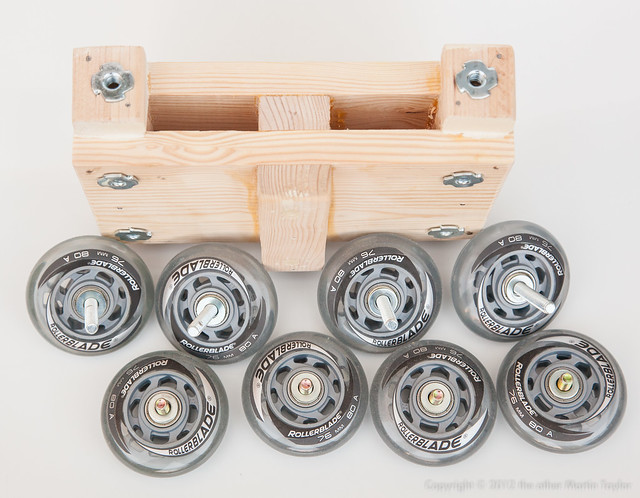
DIY Mini-Skate Wheel Dolly Pre-Assembly
Truck with wheels removed, ready for paint
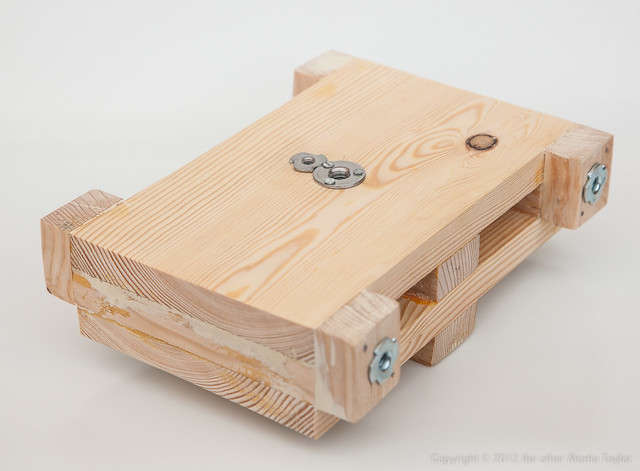
DIY Mini-Skate Wheel Dolly Body
Bare truck body
 If you're a SketchUp geek you can download and explore my construction model for this design.

DIY Photography: Ikea Macro Lighting

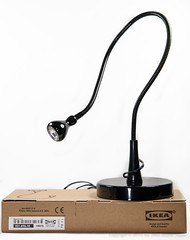
Ikea JansjoI was in Ikea the other day when I stumbled across the JANSJÖ desk light for a laughably cheap $10. Sometimes Ikea's pricing is just weird: this version of the lamp is $10 but the same lamp with a clamp base, or a wall mount instead of a weighted one is $30. It's basically the same light for a third of the price.

Once I got over the bargain price I realized how useful the Jansjo might me for table top studio photography. The Jansjo is a 4watt LED bulb at the end of a very long, thin goose neck. It produces a very clean, focused light source while remaining relatively cool. We think of LEDs being a very efficient, cold light source but when one is producing this much light there is some heat loss and, although to can comfortably take hold of the lamp and position it even when it has been lit for some time, it is warm to the touch.

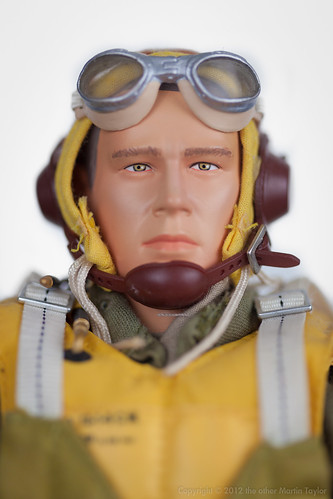
In my table top photography I've found that it is a relatively simple matter to light that high-key, floating on white look. Basically, you stick the item in a softbox and then flood it with light and you end up with something like this:

Portrait of George Taylor
Example of flat white light in a softbox
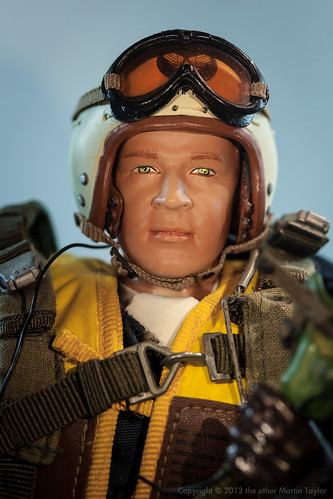
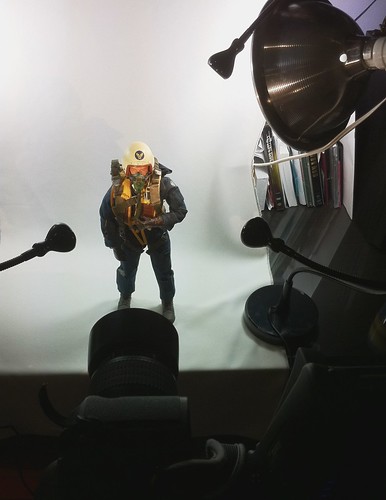
If you want something a little more controlled to bring out modelling in your subject you need to be able to control the position, direction and relative strength of your light sources. The Jansjo lights are perfect for playing with this kind of setup. Not are they cheap but their long, thin goose-neck supports and heavy bases make them simple to position and adjust. The next picture is a similar subject to the previous soft box shot but this time I used 3 point lighting for the subject and a couple of broader lights for the background:

F-86 Sabre Pilot, Col. Walker "Bud" Mahurin
Example of directional light from the Ikea LED lights

Table Top Portrait Studio
Ikea Jansjo lights being used to create
the above action figure portrait
Both kinds of lighting setups have their place but the little Jansjos are now a favorite of mine for macro and table top photography. During the work week the 4 lights I have have the life of standard task lights on my desk but some evenings and weekends they can quickly be re-purposed for use in my desk top studio. Just remember to manually set your white balance with these lights - they're a little warmer than you might expect.

Highly recommended

The Plastic Fantastic HDSLR Shoulder Support

Trying to work out what goes where
here you can see the position of the Zoom H4 
Let's take it as read that the DSLR used for making HD video is a beautiful but flawed compromise. This statement is true of almost every aspect of the format but nowhere more so than the form factor which is especially obvious when you take the camera off your tripod and try to hand hold it. For taking stills it is perfect but when taking video without the optical viewfinder available it is clunky and awkward. So an exclusive cottage industry has been built around the idea of making your HDSLR feel more like a real, movie camera.

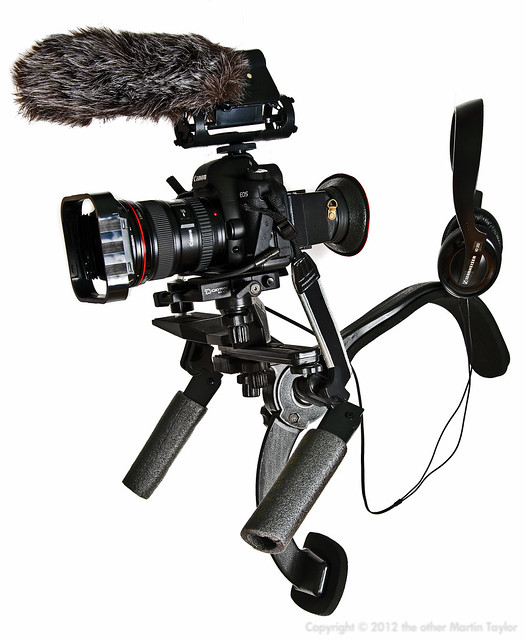
If you have an unlimited budget there are some beautifully engineered rod and rails camera systems out there. Industry professionals may be able to justify a shoulder support that costs as much as their camera, it may even seem cheap to them, but to the rest of us working stiffs, it is an expense that is hard to justify. So, like many other enthusiasts, I was excited when the Adorama Shoulder Support surfaced for $45. If I'd waited I would have been able to get the same thing for about $10 less from Cowboy Studios but even on my meager budget this accessory was more than worth taking a chance on. When it arrived about a year ago I played with it a bit but it has taken me many months of occasional messing around to get to the point where I'm happy with this rig.
Plastic Fantastic HDSLR Shoulder Support
How I configured the cheap shoulder support for run and gun, one man shooting.
Here are the components I used, less the sound and camera gear of course:
Total $132.25

Hopefully the picture clearly shows how I assembled these components but, to summarize I attached the straight flash bracket and the shoulder mount included camera platform directly to the shoulder mount using a hardware screw. This makes the thing difficult to break down without a screw driver but what kind of geek travels without their Leatherman anyway? It also makes the contraption more solid and is necessary as the included finger screw will not reach through two accessories at once as I required. I then used the included offset to raise the camera up to eye level; if you're using the battery pack this component is not required. On top of that I put the quick release bracket. When I'm assembling this to use, the camera is the last component I put in place and the first I remove as the whole thing is a little unwieldy and difficult to put down. The quick release plate is also compatible with my video tripod which makes switching from shoulder mount to tripod a quick process. By taking your time and adjusting the angle of the offset and quick release plate and the forward and back movements of the release plate in the clamp it is possible to get the camera viewfinder in a really comfortable and natural position for filming. Take time over this and tweak it when necessary to prevent fatigue.

On the far right side (when you're wearing it) of the support I put a mini ball head I already had to which I can fit my Zoom H4 audio recorder. The ball head allows me to tilt the H4 into such a position that I can see the display while filming so that I can be sure I'm really recording sound and am not just on standby. From the line out on the H4, to the 5D mic in I use the Pink Noise cable to step down the signal level. From the headphone out I always have my cheap but wonderful Sennheiser HD 202 headphones - you should always be monitoring the sound you're recording to avoid any nasty surprises when you get back to edit your footage. When I'm using this shoulder mount I usually use the Rode Video microphone fed into the Zoom H4 although I can also use the Zoom's built in microphones when I need a stereo recording or wired Lavs or a hand held microphone if we're not moving around too much and are doing interview type footage.

The 'handles' are actually Pedco UltraPod II table top tripods which have a strong ball head which allows you to lock the handles in any position you want. They're not as strong as dedicate solid handles but they work and, like most of the components I used, they can be used for other things when you break the rig down. I slipped some offcuts of pipe insulation foam over them to make them more comfortable but, as most of the weight is taken on your shoulder and rib cage they are not used as much to support the rig as to balance it.

The only other tips I can think of are, if you leave your camera strap on, like I do, hook it through the shoulder rig when you mount the camera so it doesn't flop around and get in the way of fall into frame. I also removed the included pin and rings for the shoulder mount strap - I found that using it hindered more than it helped when moving around and trying to keep things steady. 

I also urge you not to blindly copy my setup but to experiment for yourself to find what works best for you. You should also practice using this rig and capturing test footage long before using it in anger. There's a lot to think  about in HDSLR video capture and wearing the camera on your shoulder adds a whole extra level of complexity and it takes time to get comfortable with it.


Simple iPhone Earphone Mod

My Eargells were colorful: those available today are clear
When it comes to headphones I'm more of an over-the-ear, enclosed-back kind of guy. In my mind there's still no substitute for big drivers and a sealed enclosure to get decent sound quality. That said, those kind of headphones are bulky to carry and conspicuous when you wear them so sometimes you need more pocketable earphones.

Perhaps I have freaky ears but I cannot find in-ear headphones small enough to fit in my ear canals and the standard headset that comes with the iPhone falls out of my ears with little provocation. I have to hold my head absolutely still and, because they fit so loosely, the sound quality, which is marginal at the best of times, is weak and tinny. Certainly I could not run wearing them or even walk around in them.

I contemplated the hack that I've seen to make custom silicon earpieces but that seemed like a lot of effort for the crappy stock headset. Then I came across Jabra eargells. They seem to be intended for ear-bud style headsets but with a little persuasion they'll fit on the standard Apple earphones. They don't stay in place very convincingly though so I added a couple of drops of plastic-specific super glue to them to keep them from moving. I can now run wearing these headphones and the sound quality is much improved as the little sound there is is directed into your ear instead of spilling out. The sound quality does not approximate a decent pair of enclosed headphones but that was never the point. At least I can now use the OEM headphones when I'm out and about which were previously useless to me. I can stuff them in a pocket and if I loose or break them I won't be upset.

Cost: less then $10.
Time invested: 10 minutes.

DIY PVC Table/Skater Dolly


Introduction

A table dolly is a small, low profile camera support designed to be used on a table top and often used to add movement to product shots. Its axles are usually adjustable to allow it to travel in straight lines or curves and circles. It can be used for a lot more than product shots though. On a suitable, smooth floor it can be used for low-angle tracking and trucking shots. If you have a folding table (borrow one from craft services if you don’t) or a board on a couple of saw horses you can also easily simulate a slider or a traditional full sized tripod and dolly movement.

There are lots of commercial table dollies available at all sorts of price points. A lot of people have also made DIY versions ranging from the complex copies of the commercial offerings to a bean bag balanced on a skateboard. This version is very influenced by the Frugal Filmmaker’s project (http://filmflap.blogspot.com/2010/06/make-pvc-table-dolly-for-under-20.html I’m a big fan of his video tutorials and attitude) with a few key differences. The main one is that his design is intended for smaller camcorders but I wanted to be able to use it with a larger DSLR with a decent lens too. Too this end I needed the dolly to be more stable, so I made it have a larger wheel base. I also wanted it to take a more substantial head so I made it accept any standard head with a 1/4” screw mount. Being lazy, I didn’t want to have to cut any PVC pipe either so I came up with a simple drill, glue and screw design using easily sourced, hardware store, parts.

Supplies

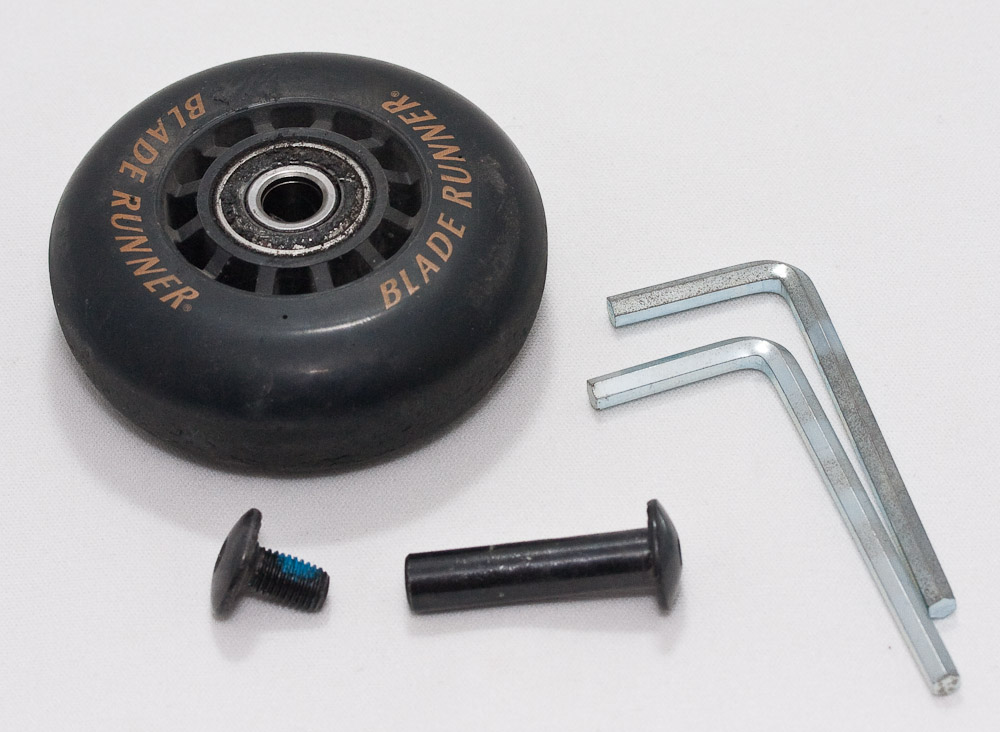
  • 1 Rollerblade (go to the thrift store if you don’t have one lying around from the 90’s; they’ll have plenty to choose from for a few dollars. It doesn’t need to be very high quality. It just needs to have 4 wheels and bearings in decent shape.)
  • 5x 1/4” diameter, 1.5”long machine screws and appropriate washers and nuts for axles and to mount head. If you salvage the axles from the skate wheels you only need 1 screw to mount the tripod head.
  • 3/4” PVC pipe components
    • 4x connectors
    • 4x 3” risers (threaded both ends)
    • 4x Screw on end caps
    • 2x plain T-joint
    • 1x T-joint threaded incoming pipe
    • 1x screw in plug
    • 2x 90 degree elbows
  • Glue
    • PVC Cement
    • Epoxy (the 7 min version specifically for plastic works best)
  • Optional: Goof-off or some kind of solvent to remove the sticker residue.

Tools

  • Drill
  • 1/4” bit
  • Allen Keys (to disassemble the skate)
  • spanner/wrench

Construction
1. Preparation:

  • Remove the wheels from the skate. If the axles on the skate are useable, salvage them as well.
  • Remove stickers from the PVC components. This is the hardest part of the project but with the stickers covering all these components they won’t go together properly.
Running gear:

  • Drill a hole in the center of each of the screw on end caps.
  • Screw the wheels on to the end caps. Use a washer or two between the cap and the wheel and the nut and the wheel. You can either use new hardware or the original axles from the skate. I used the original skate axles (hex keys required) and nylon washers I had lying around between the end caps and the wheels. The wheels need to be tight enough to be held securely but not so tight that they don’t run freely.
  • Glue the axle in place in the end cap using the epoxy for further rigidity. Set aside to cure.
  • Glue a riser into each side of a plain T-joint using PVC Cement and a connector into the top of it - repeat for the other set of running gear.
  • Screw the wheel assemblies on to the end of each riser.

    Body:

    • Glue a connector into each smooth end of your thread T-joint.
    • Glue a 90 degree elbow onto each of the connectors. It is critical that this assembly is true if all 4 wheels are to sit level at once.


    Tripod head mount:

    • Drill a hole in the center of screw in PVC plug.
    • With a washer on the bolt, screw it through the hole you made. Using a set bolt on the screw and the washer make the screw protrude about a 1/4” through the plug and is solidly in place.

      Assembly:

      • Screw the tripod mount into the threaded t-joint on the body.
      • Mount any small to medium sized tripod head on to this. A small ball head is the most compact for traveling but a pan or small fluid head is easier to use.
      • Slip the running gear onto the body. Friction will be enough to hold them in place but they should be loose enough to set a turning radius.
      • Mount the camera onto the tripod head and you’re ready to roll.


      Use/Demo
      Just like any other camera movement, using the table-top dolly takes a little practice to get smooth. Use it to circle, or describe an arc, around or past an object. You can also dolly past or along a subject. You can also truck into or out from a subject. If a small subject is too low relative to your camera’s lens a small, improvised stage can be used (an upturned glass is useful). Set the radius of your turn before moving the camera and don’t try to adjust it in the middle of a movement.

      Demo: http://www.flickr.com/photos/martintaylor/4970049615/

      Improve the Google ranking of your portfolio site

      I was recently asked by a photographer how she could improve the ranking of her site in google's results. I asked the obvious question, what google searches did she want her site to appear in? She told me "San Francisco based photographer" and the like.

      So I took a look at her site. It was really nicely designed, showed off her work professionally and her work looked great but it was certainly not optimised for Google ramkings. Her site was built by a graphic designer who made the typical mistake of assuming that if you put keywords into the metatags (metatags hold information about your page/site that are not visible to your viewers but are used by other programs) that would be enough to court search engine spiders and bots. Unfortunately, google no longer really uses the keywords metatag very heavily, if at all. It was too easy to trick search engines into ranking a page highly based upon its keywords when its content may have had little to do with those words. Indeed, some speculate that if your page has keywords which are not then found on that page that your page may be penalized for "keyword spamming" and suffer in the search engine's ranking as a result. One thing we to do, therefore, is make sure that your keywords are also found elsewhere on your pages.

      Please keep in mind that I'm not a specialist in this area and that improving a site's ranking is something akin to alchemy and is not an exact science but is subject to change whenever google changes its bots.

      First off, a tiny bit of technical background to put my suggestions into context. Photo portfolio sites are at a distinct disadvantage when it comes to search engine rankings. Why? Because search engines, and google in particular, do everything they can to rank what they consider the most useful and relevant results first (I won't complicate things be talking about those who chose to pay to improve their tankings). How does google do this? Mainly through the text found in various places on your pages (both hidden and visible) and through how many other pages link to your site. Being so image heavy in their content, as opposed to text based, puts photo portfolio sites at a distinct disadvantage in this regard.

      Two tags that are used more heavily by search engines are your page's title and its description. The page's title is the text you see in the very top of the window of your browser when you visit a site. It is, therefore, really important that we get the page title right. For the site I was looking at I suggested something like " - a San Francisco / Bay Area based photographer specializing in lifestyle, interior, portrait, editorial and travel photography". Changing this could be the single most important factor in improving a sites ranking.

      The description metatag is what a search engine uses to describe your site when it returns results. If a page does not have a description tag the search engine simply uses the first few words of text it can find on your site. This was what was happening with the site I was looking at so I suggested putting a description on to each page, something like: " is a San Francisco based photographer working in the Bay Area and specializing in lifestyle, interior, portrait, editorial and travel photography." This may seem very repetitious when viewed in relation to the title I suggested but there is a search engine concept called "keyword density" that I won't bore you with but basically means that the more often you page contains a word that the search engine indexes, the better its position in the result rankings.

      Another thing I suugested we could do that may have a small effect on rankings is to optimize the "alt text" associated with the images on the site. The alt text is a piece of information associated with an image that tells the browser what the image is in a textual format. You rarely see this text but as a portfolio site has so little textual content we should take every opportunity we get to add some. I suggested that each image should contain a description like " - by - a San Francisco based photographer working in the Bay Area and specializing in lifestyle, interior, portrait, editorial and travel photography." Again, it may seem repetitive but keyword density means that it may pay off when a search engine hits your site to index it.

      As the site was so image heavy I also suggested that adding a biography, mission statement or content page of some kind. This page could be then used to inject more text into the site which google would see as making your site more useful and, therefore, might affect the result rankings possitively.

      Finally, the most important factor that will affect your site's rank I couldn't really help the site's owner with. That is the more often other "useful" sites link to a site the more useful google thinks the site is and the higher it will rank it. Do whatever you can to get links to your site put on other sites; get clients to link to your site from their acknowledgments, get your site listed in directories of similar sites. Do you ever write anything that is published on the web? If so, make sure you have a link back to your site from the article. Do you post to any bulletin boards or newsgroups? Put a link to your site in your signature so it's included in every post you make especially if that community is, itself, indexed by google. Persuade friends to link to your site - whatever you can do to get links to your site, do and the higher the ranking the site linking to yours has with a search engine itself the better. Google rates a link from an "important" site higher than a more provincial one.

      How to Use Meta Tags In Search Engine Promotion
      How to Improve Your Search Engine Ranking on Google
      Score Higher in Google Search Engine (and why Google is saving the web.)
      The Search Engine Tutorial for Web Designers

      How To Set up Movable Type on 1and1

      In the last few weeks online communities in general, and the blog world in particular, have been splattered with reactions to the news that a host called 1and1 is giving away three years worth of premium hosting. 1and1 are a huge hosting service in Europe (they claim to be the world's largest) and this promotion is part of their strategy for moving into the American market. Netizens were understandably skeptical about the offer, after all, how good could a service that is totally free be?

      Never one to pass up a bargain, I signed up and even finally got around to registering my own domain which cost a modest $6. I had been wanting to play around with movable type for some time, not to keep a "dear diary", but as a way to display some photographs and as a way to create a dynamic repository for anything I wished to publish (like this information). 1and1, unlike most other cheap or free hosts, seemed to provide all the resource I needed to be able to do this at no cost or risk. Too good to be true? It turns out you can still get something for nothing on the web and that the quality of the hosting is not always determined by the price you pay. The fact that you can read this missive is proof enough that 1and1's offer is straight up and can host movable type. If you too are looking to play with MT or just want 3 years of something for nothing too and you're a US resident I suggest you sign up for 1an1's offer before it ends at the year's end.

      How do you set it up? I did not keep notes while I setup MT on 1and1 but I will try to lay down some pointers as to how I got it running:

      First off you obviously need a 1and1 account. Sign up for the offer and you get back an email telling you how to activate your account. This involves giving 1and1 a US phone number where you can be reached in the next few minutes. An automated call is placed by 1and1 to that number giving you a pass code. You then enter this code into the authorization page and your account is ready to use.

      Through 1and1 you can then get a domain you already own redirected to your new host. 1and1 can also be the host for more than one domain or for various sub-domains. As I didn't own a domain I wanted to use for this site I bought one through 1and1 which took about 24 hours to be registered and activated.

      The next thing you need is the Movable Type program. I downloaded the latest full version with libraries from movabletype.org and started following their installation instructions. The instructions can be a little overwhelming if, like me, this is your first experience of installing movable type but, as long as you go through them carefully it is an easy install. Here are 1and1 specific instructions to augment MT's own instructions:
      • Finding Perl on your Server - don't worry about it, Perl is in its default location on 1and1 so you don't need to change your cgi scripts to point to a different perl location.
      • Installation Directories - The application - in 1and1 your whole directory is cgi enabled, not just a specific cgi-bin, so you don't need to worry about relocating your static files. As for the installation directory itself, I chose a sub-directory under my home directory, called "moveabletype". This was for my own sanity and to keep the MT files apart from and static pages I may want on my site.
         
      • The database - I used MySQL so there was no need to create external directories.
         
      • Configuration - Configure Movable Type URL - I used the subdirectory moveabletype again for this.
         
      • Configure Database options - before you set this you need to go to your 1and1 control panel and enable the MySQL database. Now go to the "webspace" menu on the control panel and select "MySQL Configuration" and note your database name, user name, password and host name. Use these values to set the mt.cfg values for ObjectDriver (DBI::mysql), Database, DBUser and DBHost.
         
      • You can now skip all steps to "Set your SQL database password". Open mt-db-pass.cgi and replace the password with the password you noted down from you control panel.
         
      • Uploading files and setting permissions is just as described in the MT instructions. Do remember to be specific about whether the transfer is ASCII or Binary. I used smartftp and it was very easy to transfer the files in two loads; one for each style of transfer.
         
      • Create your Movable Type database directory - skip this step.
         
      • Checking for Perl Modules - running the http://www.your-site.com/mt/mt-check.cgi url worked first time for me as it will, hopefully for you.
         
      • If all goes well you are now ready to start using movable type.