Showing posts with label Reviews. Show all posts

Top 3 Most Interesting Products at NAB 2013 for Guerrilla Filmmakers

If you follow video production products and technology you can't help but notice that NAB 2013 has just closed. I was watching the news and press-releases from afar and here are the top 3 products that peeked my interest and that will be of interest to Guerrilla Filmmakers. Perhaps we wont be dashing out to buy these tomorrow but they do give us some insight into the direction that products may be heading in the next year or so:

BlackMagic Pocket Cinema Camera

No surprise what my top most interesting product of NAB 2013 is: the BlackMagic S16 Pocket Cinema Camera. No surprise it's of interest but I don't think many people saw this one coming. For about a grand you get a pocketable video camera that records with 13 stops of dynamic range in lossless format to cheap SD cards and takes micro-four thirds lenses. Name one filmmaker who isn't intrigued by the idea of a cinema quality camera that fits in your pocket. If it delivers on its promise of being small enough to carry anywhere but flexible enough and adaptable to scale into the heart of a full on film rig, BlackMagic are going to sell thousands! 

The biggest issue I see is BlackMagic's reputation. In my opinion they are the most innovative camera manufacturer out there today - and they are out there. They aren't constrained by decades of previous designs or a huge current camera lineup that they have to be careful slotting into without rocking the boat too much. As a result we are seeing revolutionary cameras from BlackMagic. On the downside, they don't have decades of R&D and manufacturing know-how under their belts and they seem to be rushing their products to market. They're catching a lot of press but they're also getting something of a reputation for shipping beta hardware with an understanding that they'll fix the software at some later date. The jury is still out but I can't wait to read review from real-world users of this camera when it ships this summer.

Tascam DR-60D PCM Recorder
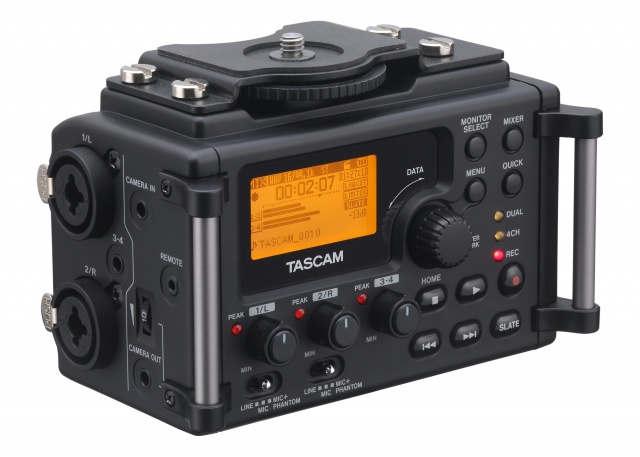
Is Tascam's new field recorder revolutionary or just a DR-40 in a fancy frock? It does share a lot of the features and specifications of the DR-40 but that's not a bad thing. The DR-40 has been over-shadowed by the Zoom H4n although they are very similar and the Tascam is the best part of $100 cheaper than the Zoom. While both the Zoom H4n and DR-40 are used by many, many HDSLR videographers, using them has always been a little tricky as is attaching them to your camera or rig. The DR-60D shows that Tascam has been listening to videographers; the aesthetic and UI both seem perfectly suited filmmakers and there are several features that will be very useful. Currently you can't find the DR-60 for less than retail which, at $350 is $80 more than the street price of a H4n and $150 more than the DR-40. At that price I see a lot of Guerrilla filmmakers sticking with the less convenient form-factor recorders. Once the street price drops $50 or more things will start to be interesting. 

The takeaway here is that manufacturers are listening to enthusiast filmmakers. Hopefully we'll be seeing even more of these kind of products geared towards our use-cases instead of us having to adapt devices not designed for our purposes.

Freefly Movi M10 Gimbal System

At $15000 most guerrilla filmmakers are not going to rush out and buy the much-hyped Movi M10 digitally-stabilized camera gimbal support. It does look amazing though as anyone who has tried to fly their DSLR on a GlideCam without a lot of experience can attest (I count myself among that number). The buzz from the show was that the steadicam operator's days were numbered and, while this is probably a huge exaggeration the promise of being able to run and gun with dolly-like stability is intriguing. Hopefully the M10 is like looking at the new S-class Mercedes you will never be able to afford: many of the features you see in the top of the line Merc that seem space-age today, will be commonplace in a few years. We live in hope.


My Tech Top 10: 2012 Edition

One of the blogs I follow is Apartment Therapy and they have section called My Tech Top 10. Each year they ask contributors and influential people to describe ten items of technology that have been most useful to them that year. I'm just a reader of that blog and have little influence, but I still thought it would be fun to make my own list so here goes:

iPad 3

In first place has to be my iPad. I had the first generation of the iPad and it was fun, but I got the iPad 3 in the summer and it fulfilled the promise the original iPad hinted at. Of course, Apple made it old-tech two months later when they released the new iPad and we're already hearing word of yet another iteration early in 2013 which makes me a little angry but then again, when I'm using the iPad 3 (and I use it a lot) I don't feel like I'm using old-tech. 

The retina screen is just beautiful - it's the end of the era of being able to see pixels. It's powerful enough to work on and play on. I do like my iPhone but since the iPad 3 came into my life the iPhone is something I use to text and make calls and if I use it for anything else it feels like a compromise I have to make until I'm back with my beloved iPad. The iPhone is just a bit squinty to my old eyes whereas, the iPad may not be small enough to go in a jacket pocket but I see why Mr Jobs thought the iPad's screen was the perfect size. It's great for watching video, making music, it's effortless for Skype, great for Pinterest and Flipboard, it is my preferred interface for dealing with my email and calendar. Typing on the glass keyboard is a compromise but one you quickly adapt to but with a bluetooth keyboard that compromise disappears and so Google Docs, and Celtx become all the more useful.

I'm sure it's not perfect for everyone but for me I am now lost without my iPad. It has largely replaced my laptop: I either use the iPad or wait until I'm back at one of my desktops. I didn't get it when it first came out ("Why would I want a massive iPhone that can't make calls?") but now I get it.


Lightroom 4

Just like the iPad makes more heavy duty devices less relevant, Lightroom makes Photoshop seem slow and cumbersome. There are not that may pieces of software I love (I like a lot but how many do I 'love'? Not that many.) but I count Lightroom 4 among their number.

Once you get used to it, it is amazingly fast to do 95% of what I need to do with my images. Photoshop is amazingly powerful and fully featured but it contains so many functions that are irrelevant to most photographers. I'm sure I haven't tried half of what PS can do but I feel like I use all of Lighroom's features without missing much. It has made going through hundreds of pictures after an event much more manageable and without it most of my images would never get beyond being downloaded in RAW format to my server and then forgotten. The price for such a professional tool makes it so inclusive; as PS has become such a significant expense it is sometimes hard to justify purchasing, especially now LR does most of what I need. If Adobe adds layers and brushes I may abandon PS forever - I guess that's why they won't be adding those features.

Leatherman Charge

This is hardly an item of tech but it is a device that's been in my bag and used daily for about a decade now and its looks don't give away its age. Any geek worth their salt needs a multi-tool they can strip a PC down with, or cut pesky cable ties single handed, or any of a half-dozen tasks that used to send us to our tool box every day. For me that tool is made by Leatherman and the Charge is the model with all the tools I need.

Dropbox

How did we survive without DropBox? I used to have a flash-drive in my pocket at all times, but Dropbox is way more than a cloud version of a thumb drive and survives the washing machine much better to boot. It is my go-to service when I need to save items I need to access from anywhere but it has also become the service I use to share projects that are works in progress. That could be a video I want notes on from stakeholders before it goes live on YouTube, or the way I collaborate with partners even though we don't live in the same time zone, and the way I can effortlessly move items between devices and OS'es - PC to Mac, desktop to iPhone. Dropbox has quickly gone from a novelty to a daily essential.

Seagate Backup Plus Portable Drives

Much as I love Dropbox it's neither big enough, nor fast enough for the huge video projects I work on, need to backup and to transport between my office and home. I had been using old school external hard drives - the big ones that need a separate power supply and take up half your bag - when I made the discovery that these small, laptop drive based drives were no small enough, fast enough and cheap enough to replace my old drives. I love that they don't need a separate power supply and that you can get a terabyte for about $80. Until the cloud becomes faster and cheaper for the amount of storage I need, these drives make an elegant stop-gap.

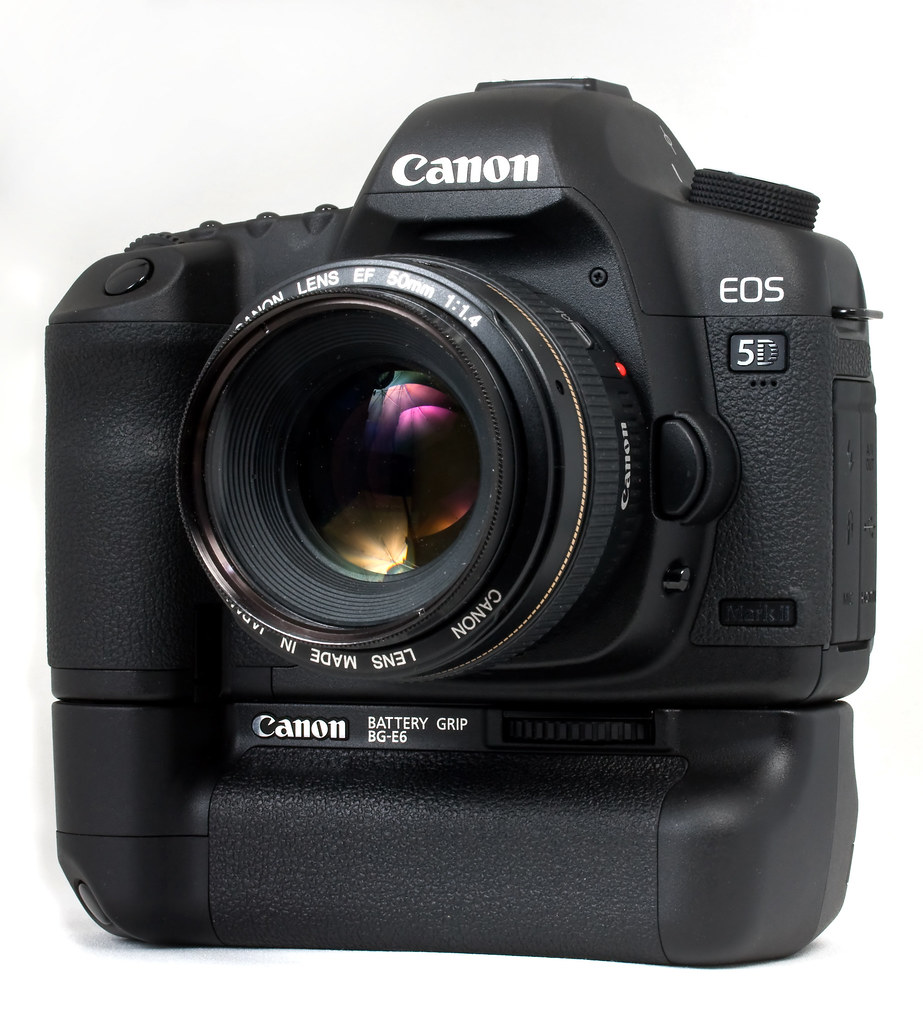
Canon 5D MkII

I know 2012 was the year of the MKIII and, as I write this, the 4 year old MKII has just been officially retired, but I still use my MKII's daily both for stills and video and don't see the need to replace or retire them just yet. This camera made me a better photographer and it taught me about video production. 2012 was the year this kind of multi-media production officially became part of my work remit so I have the MKII to thank for getting me out of the coding trenches (at least until they realize I don't know what I'm talking about). It's not often that a high tech gadget has such a long shelf-life.

Adobe Production Premium CS6

Work had been promising my this software since 2011 but in 2012 they finally delivered. Before that I had been making do with the consumer software Photoshop Elements and Sony Movie Studio. Both taught me a lot but I kept hitting problems with both that getting the professional software has helped overcome. I no longer have to leave a day just to render a project in the fear that it won't complete or it will introduce glitches. Premiere had a pretty steep learning curve but now now going back to Movie Studio feels like going from a car to a push bike. I'm glad I didn't have to buy it myself as it is quiet spendy but oh, so worth it.

Flipboard

There are several apps I use daily on the iPad and Flipboard is the ideal way to consume all sorts of niche and mainstream news. Flipboard is the modern Newspaper.

Downcast

If Flipboard is the modern newspaper then Downcast is the modern radio. Since TiVo came along I haven't watched live TV except in hotel rooms or at my parents house since. I still listen to NPR but not live anymore. I've been a follower of podcasts for years but Apple's idea of over the air syncing left a lot to be desired. Downcast was my stopgap until they sorted it out but now, even though Apple have their own podcast app, I'm sticking with Downcast.

Sennheiser HD 280 pro Headphones

I know it's the year of the new Apple ear-buds and super-expensive, rapper-endorsed headphones but my HD 280's are the last in a long line of Sennheiser headphones I've owned. They're not for going out but if you need to monitor audio in a loud environment their ear cups seal out most of the room noise. If you have to mix or edit on headphones they are naturally uncolored. They're boringly black but affordable and comfortable and another piece of tech I use daily and am glad for.

In Paise of the Cheap, Black, Plastic G-Shock

I have a confession to make: I used to be something of a watch snob. That's not so unusual for a guy as we only really get to wear one piece of 'jewelry'. I love mechanical, military style watches which are pretty understated and the opposite of hip-hop bling but the good, collectible ones can be pricey nonetheless. I have one or two nice watches that I like to wear for special occasions but even these ostensibly utilitarian timepieces require some care and maintenance. The most obvious issue is if they're not worn and/or wound regularly they don't even run. If they are not run regularly they tend to be less accurate and when they need to be restarted setting the time and date is a pain. There's nothing defines 'pointless' better than putting a watch on when you get up and looking at your wrist to see when the train is coming to find the hands haven't even started to move yet or it's obviously at least two hours off.

Watches I own don't cost thousands but they do cost hundreds which means I'm a little precious about them when I go to the gym or work on my car and, no matter how careful I am, they do occasionally collect scratches to their case or glass that no one but I will notice but it drives me crazy anyway. So what is the point of a watch you're afraid to wear and isn't as accurate as your cell phone anyway?

I do like to wear a watch. It feels natural to me when I want to know the time to refer to my wrist. I come from a generation where learning to tell the time and getting your first watch were rights of passage. I still remember every detail of my first watch, a child sized mechanical Timex I still have in the back of a drawer somewhere. I want to wear a watch but I want to bow out of the escalating horological arms race with my richer, more successful friends (I am the Miata to their 911s). I want it to work unconditionally, be cheap, unremarkable and tough. So, of course, there is only one choice; the G-Shock DW-5600E.

I'm not talking about the collectable original version with the screw-down back and the Keanu-Speed association. I'm talking about the current version that costs less the $40 on Amazon. The watch that G-Shock aficionados deride and no one else even notices you're wearing. The watch that was one of four timepieces approved to go into space on the wrists of Shuttle astronauts. The watch you can bash into the wall and the wall will come off worse. A watch you put on and forget and abuse and it just keeps on going and looking exactly the same. I'm not talking about any of the limited edition versions in 'look at me me!' primary colors, or with reversed faces that look cool put are impossible to read, or advanced features to charge themselves from the sun or automatically set themselves.

I'm talking about the cheapest G-Shock out there. The poor imitation (in collector's minds) and successor to the original G-Shock. The ultimate cheap, black plastic watch.

It's a watch that draws no attention to itself but if you look at it closely has a rugged, utilitarian charm. It is chunky and substantial without being heavy or cumbersome.  Its recessed face is protected and intuitive to read. Its integrated strap is supremely comfortable. The recessed buttons are protected from accidental use but responsive enough to work with work-gloves on when you need to. Its one flashy feature is its back light which works just long enough for you to read the time without compromising the long battery life. When the time finally comes to replace the battery it is almost a shock to the system that this watch needs any attention at all but removing the back just needs a common jeweler's screwdriver not a specialized watch back opener and it is the work of a couple of minutes to do the job.

This watch is the antithesis of a fashion statement and so has a charm all of its own. There's a reason this watch is used and abused by astronauts, military personal, first responders, law enforcement etc. If you want to know what the toughest, most comfortable shoes are to wear all day are look at the feet of police people, nurses or chefs. They won't be the prettiest shoes but they will be practical to a fault.  That should be the DW-5600E motto as well: practical to a fault.

So why have I wasted so many words not reviewing a product that doesn't require another review anyway? Let's just say I am a fan. In a world that can be expensive and complicated it is what is is - I usually hate that conversation-killing statement but it seems totally apropos for the DW-5600E. There is nothing ironic, or political, or elitist, or hipster-cool, or over-sized machismo about this watch. It's more watch than 99% of us will ever need for much less money than we deserve to pay.

So it bears repeating:

... it is what it is.

Skullcandy Hesh Headphones: Refinish

I have a slight headphone fetish. As I'm not encouraged to blast my music anymore I listen to music, write music, produce and edit video all while wearing headphone these days. I don't like in ear buds, I prefer big, over the ear headphones with my favorites being the chunky but beautifully solid and neutral Sennheiser HD 280's. As a result of this obsession I have several pairs of decent over the ear headphones lying around both at home and at work.

When I saw the Skullcandy Hesh Headphones in NBA Cavaliers Colors ridiculously cheap (they're usually $40-50) I couldn't resist. They had a built in iPhone microphone which I thought would be useful but I didn't like their paint job - I don't follow any American sport so I planned to refinish them.

This weekend I finally got chance to do that. Here's the process:

Disassembly:
  • Remove the earphone soft pads - they just pull off
  • Undo the 3 screws hidden under the ear pads
  • Separate the plastic holding the driver from the shell
  • Desolder the wires from the drivers (2 joints per driver) making a careful note of what goes were when we get back to reassembly.
  • Unscrew and remove the detail pieces in the shells (they were gold in my case).
  • Remove the connection cord from the left shell.
  • Carefully expand the c-brackets where the headband meets the shells and prize out the shells
Painting:
  • Using a fine sanding block, remove the existing paint from the exterior of both shells
  • Remove all dust then carefully spray paint the shells using several light coats
  • Let the paint cure at least for 24 hours
  • Using cutting compound, cut back the paint surface.
  • Polish the newly painted shell exteriors.
Assembly
  • Assembly is the reverse of disassembly.
  • Take care when soldering wires back in place.
  • All plastic components are labeled Left or Right somewhere in their molding
  • Take care not to scratch your new paint surface when reattaching the shells to the headband.
  • Drivers can only fit back in the shells one way, with the plastic lump towards the bottom.
  • When refitting the soft pads you can persuade the vinyl edge back into the crack between the shell and drivers with a blunt knife blade.

To complete the de-badging I also unpicked the badges from the fabric covering the headband. There you have it; slightly less obnoxious Skull Candy Hesh headphone but how do they perform?

You can tell the market these headphones are aimed at (not me); the headphones are very bass heavy. But it's not just the the bass is over powering the mids and highs - the mids and highs seem to be completely missing. Construction wise the Hesh plastic is very creaky which does affect your listening experience if you move your head at all while wearing them. Ear seals are far from perfect so they don't exclude as much of the outside world as you think they should. A cheap pair of Senneiser HD 202 headphone's easily out performs the Heshes acoustically. The Hesh headphones don't sound that bad if you haven't just been wearing good quality headphones. I do keep them around specifically for use with the iPhone as the cable fits with the bumper in place, they have an inline microphone and they do sound better than the apple included earphones.

How 3D is spoiling 2D

This weekend I saw the last Harry Potter twice: first in 2D and the next day in 3D. I am a fan but not that big of a fan but it was just a accident of circumstance that led me to see it twice in quick succession but it did allow me to compare the 3D and 2D prints while each was still fresh in my mind.

Quite a few critics are citing HP as an example of 3D done right. I'm not so sure. I know you're rolling your eyes and dismissing me as yet another 3D hater but hear me out as I think I've finally put my finger on what it is about the current 3D movies that doesn't work for me.

Harry Potter demonstrates the problems that still remain in state of the art 3D technology. I am not an expert in this technology so I can only report what I perceived through my own eyes. As I understand it, there are two ways of making a 3D movie: during production (with 3D cameras) or in post (on 2D source material). HP is the latter (except for one scene). Converting 2D source material to 3D is a big, labor-intensive industry. Artists go through by hand rotoscoping the elements in the frame which can then be set on different 3D planes. So, if you have a character in the foreground, another in the mid-distance and then the setting as the background you would separate the three elements so you can put one in front of the other, in front of the other. It does give an illusion of depth but, as far as I can see, it doesn't convey the subtitles of real world 3D.

In the real world there aren't just three 3D planes in the scene described above. The character in the foreground is 3D in his own right - his nose is closer to than his ear and the perspective between the two points is gradual. As a child did you ever make a 3D diorama peep box, or shadow box, or cardboard puppet theater? It seems to be the same principle. One thing is in front of another giving the illusion of 3D but each of those things is flat which ruins the illusion in a paper model and a multi-million dollar movie.

To my eye these flat 3D movie planes layered over each other actually look flatter than and normal 2D movie. When you're watching a normal movie you quickly forget that you're watching something flat and 2D. 3D is represented by depth of field, lighting changes and camera movements and by the viewers own, intrinsic, visual intelligence. In someways that is taken away from you in a 3D movie. The flat areas layered over each other look flatter because you're fighting to interpret the flat areas within a layered 3D environment. It's also hard to become unaware of this visual trick and once you see flaws you constantly get pulled out of the illusion as a result.

'So, why not just go and see it in 2D you Luddite?' I hear you ask. Well, because the emphasis is on 3D the 2D print suffers. What do I mean specifically? You seem to see some artifacts in 2D as a result of the 3D process. In Harry Potter and the Deathly Hallows Part 2 there was a specific scene that made this obvious to me. After Harry, Hermione and Ron have dropped into the lake off the dragon's back they are walking around a hilly area, getting warm and talking about what they are going to do next. When I saw the scene first in 2D something didn't feel right. It almost felt like they had been filmed separately from the background and green-screened in - like they were stuck on to the background rather than really being in it. If it was a still photo I was examining I would have said it was clumsy use of in PhotoShop - the kind of thing you see when someone hasn't used shallow depth of field when they took the shot but they have faked it after the fact by masking the subject and then blurring the background. You can always tell - there's something about the edge of the subject, a slight halo or something, and the background is too uniformly blurred. It's not how natural bokeh looks. Whatever the equivalent is in filmic terms, that's what I'm seeing and that's what I object to.

This all said, I loved the final movie and am very sad that the decade long journey is now over. I still give it two thumbs up in 3D or 2D but a lesser movie I might not feel so magnanimous towards. 3D is not an evolution from traditional 2D movies but an alternative to them. For the moment it is still a matter of personal preference but I'm still far too aware of the technology and process to get sucked into a 3D movie as easily as I can slip into the world of a traditional 'flat' movie.

You pays your money and makes your choice....

Impressions of the Syma S206, Mini-3 Channel, IR Helicopter

By the time it arrived direct from China I'd almost forgotten that I'd ordered the little Chinook Helicopter from eBay for $25 shipped. It took 21 days from purchase to arrival so was it worth the wait?

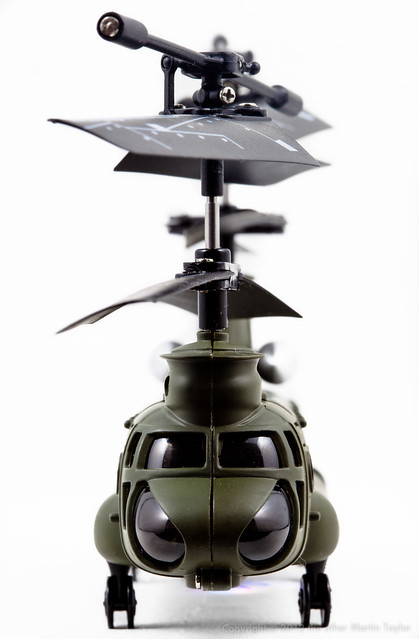
Syma S206 Nose Forward
Syma S206 Nose In
It certainly had some big shoes to full as I love my little S107: it is so maneuverable, fun and easy to fly as well as being virtually indestructible and easy to repair when you do eventually snap something. The S206 is a very different animal despite being another coaxial IR helicopter from Syma. I was expecting them to share more components than they do; they do share the same charging mechanism and battery and a couple of components in the rotor-heads and the controller is similar but beyond that parts look unique.

The S206 is a vaguely to scale Chinook transport helicopter with double rotors - a similar configuration to the real CH-47. Compared to the S107 the S206's fly bar and rotor blades are shorter but work in the same way with two motors per head providing lift and directional control. Two sets of blades makes the S206 handle very differently than the S107: I don't feel like I have such precise control of the S206 but it is very stable and easy to hover. It doesn't feel as nimble but it seems to be able to move forward quicker but this may be a symptom of the way I have the S206 trimmed. The S206 controller has two buttons as well as the rotary trim. The two 'inch trim' buttons allow you to set up the amount of forward or reverse momentum the S206 has at center stick. Of course, I have mine set up to be moving forward at center stick so I can have lots of forward momentum but this means that you have to apply reverse stick to get this helicopter to hover and you need to apply reverse stick as you lift off or the S206's ground effect will cause it to shoot forward into the wall.

The S206 is a little twitchy: you can have your hands off the directional control and sometimes it hovers perfectly - at other times it seems to get caught in a spin. This may be a result of the specific model I have - the non 'G'. The G version may be more modern and have a more sophisticated gyroscope to keep things neutral. My version with the smoked cockpit glass and mains charger may be a little more agricultural in its handling but it is still a lot of fun.
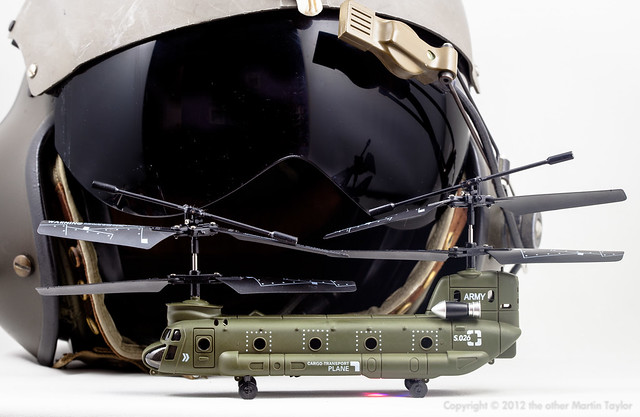
Symma S206 & Flight Helmet
Syma S206 backed my Helicopter flight-helmet

The way the S206 turns is very different to the S107. The S107 turns on a dime pivoting exactly around the drive shaft: with two drive shafts in play the S206 pivots less quickly somewhere around the middle of the fuselage. As usual with these 3 channel coaxial helicopters the S206 wants to turn faster to the right than to the left.

Because my S206 came direct from China the mains charger supplied did not fit in a standard US wall socket without an adapter (the price of saving a couple of bucks). Those that appear to know more than me about battery charging technology claim that the mains charger is a little brutish on batteries. Unfortunately, the mains charger that comes with the S206 is the only means to charge it: unlike the S107 the S206 controller does not have a charging cable. Luckily the USB cable that comes with the S107 works perfectly well on the S206. Flying and charging times are as advertised; 8 minutes flying time and about 30 minutes to charge.

From an aesthetics stand point the fuselage detail is fun although decals of rivets around the around the porthole windows and and the silver of the turbine engines is a little silly and unsubtle. It feels solid, maybe even a little heavy which may account for its performance; as the battery falls from full charge it takes more and more throttle to get it to lift and in the end it struggles to get off the deck at all. My only concern with strength are the wheels that look flimsily but are they taking the knocks although I try to avoid the kind of heavy landings I know the S107 would take in its stride. As the fuselage acts as a kind of soundbox the S206 sounds a little plastic when compared to S107, not that that means anything.

If the S107 is the cheap Miata roadster of the Syma line the S206 is the little import pickup. If you already have the S107 and you want something similar but a different flavor the S206 is a lot of fun and at $25 it's terrific value.

Antec 300 Review

Everything in place with plenty of room to breath
The last time I modded a PC case blue LEDs were new and expensive; rounded cables were hard to come by so we razor'ed and wrapped our own; the default PC case color was still beige; and a PC over 1gig was screaming. Then it became more expensive to build you own PC than it was to buy something with a guarantee and an OS from Dell or HP and cutting windows in the side of cases to show off the internal components seemed too geeky even for me.

So I buy my PC's off the shelf these days and then add components and upgrades as required. My current home desktop is a HP Pavilion m8407c. It's a couple of years old but its Core 2 Quad processor is still man enough for Lightroom, Sketchup and Sony Vegas which are the most heavy duty programs it has to deal with. I also might be the only person on earth still happy with Vista 64.

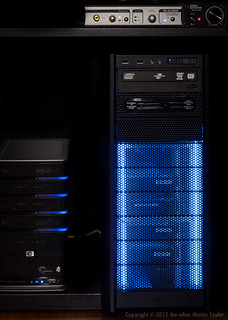
Pimped
I couldn't resist my geek tendencies to light up the Antec 300
As usual, I have had to add components to keep my machine current: 8 gigs of memory with heat pipes pre-fitted caused an issue as the hard drive cage would no longer fit in position with a drive in place. The case was holding more hard drives than it was designed for and I needed to add another one - drives were just balanced in place as there were no more spaces to fit them properly. A chunky video card and new power supply were taking up much more space than the OEM components. Finally I had to admit that I'd outgrown the OEM HP case and so, unexpectedly, I found myself in the market for a new PC case for the first time in years.

Things have moved on a lot in the intervening time since I was overclocking my Celeron 233. I don't think you could buy a beige case even if you wanted one and 80mm case fans are reserved for the most frugal of cases. That said, I didn't want to spend a fortune on a new case that spends its time hidden under my desk. I wanted something with plenty of space for expansion without being monolithic. I wanted something quiet and understated. Surprisingly, I was spoiled for choice but I after reading a few reviews I plumbed for the Antec 300 for $60 delivered from Amazon.

Understated front panel
The 300 is much bigger than the OEM HP case but is still considered a mid or mini-tower. It's exterior is an elegant black and its front is a stylish perforated metal. Behind the front is a removable, washable filter and, although the case does not come with a power supply, it comes with a top mounted 140mm fan and a rear mounted 120mm fan. The side panel will also take a 120mm fan and the front will take two more fans. That's a lot of cooling; way more than I needed and I wanted the case to be quiet not sound like a spooling jet engine in a wind tunnel. I turned the two included fans down to their minimum settings relying on negative case pressure (air gets sucked in to the case by the air being forced out of the rear) to keep everything quietly cool. The interior is plain galvanized steel and many people of the interwebs seem to paint it black for better heat conduction they claim, though really it's because it looks cooler but who's going to be looking in there except me when I need to swap a drive out? Way too much effort for such little payback.

I wasn't even going to fit a fan to that side panel but I couldn't find a way to turn off the 3-wire case fan monitor in the HP bios so, to avoid a system nag on every boot, I installed the little case fan from the original HP case to the side via a fan adapter and a 3 wire cable extender. It is definitely not needed to keep the components within working temperatures and shame on HP for not making this fan's settings accessible in the Bios.

Apart from that little issue rehousing the HP internals into the Antec was relatively easy. There is so much more room to get your hands into the case when you're installing everything than in the compact HP case. The power supply fits on the floor of the case, well out of the way of the motherboard just make sure your power supply's cables are generous enough to be that far removed. I was using an Antec power supply I'd already bought to power a beefier graphics card so it wasn't a problem for me but the OEM HP power supply might be a different matter.

I did not have to remove the CPU or memory from the board before transferring it into the Antec which came with plenty on standoffs to get the motherboard properly seated. The rear panel from the HP surrounding the motherboard ports removes from the HP case and fits in the Antec to give a professional finish. There is plenty of room to route the cables tidily and out of the way of the main components. The only fiddly part of the installation is fitting the front panel lights and switches to the motherboard. If I were to do this again I would connect those wires before I screwed the motherboard into the case: the writing on the motherboard is too tiny for these old eyes and my fingers aren't dexterous enough to easily plug those micro connectors onto the pins of the motherboard. Luckily I got them in the right place first time and did not have to revisit that part of the installation. The front USB connectors were a much simpler affair.

The right side has a box to hide cables
obviously, I don't know how to utilize that.
Antec supply a bunch of thumbscrews with the case which are great for mounting the hard drives in a tool-less fashion. There's room for 6 standard 3.25" drives with ample air flow around them. There's also room for 3 optical drives and even 1 laptop sized hard drive on the floor though I've yet to work out why I'd put a laptop hard drive in this case. Although there is no built in method for isolating the drives from the chassis to reduce sound everything is so solid that HD noise is minimal - certainly better than the OEM case.

The Antec doesn't come with a card reader and the HP's is not a standard fitting. I could have bought a new card reader for not much money but I was trying to change as little as possible from the old configuration as I knew that worked. So it was out with the Dremel like an old-school modder to adapt a standard front panel blanking plate to take the OEM card reader. It's not the slickest job you've seen but it works. The only flamboyant touch I added was to light the front panel with a couple of blue neon tubes (cost $12). I leave them off 97% of the time only turning them on when people come over and visit the man cave. I guess I'm not as grown up as I like to think.

Conclusion: for $60 the Antec 300 is a solidly built and quiet case with lots of cooling and expansion potential. If you're in the market for a classy looking computer case it is hard to beat. If, like me, you're looking to rehouse a computer that has outgrown its OEM case it's a great choice but it would be equally competent if you were building a machine from scratch. After all this time of buying off the shelf PCs this case may inspire me to building my own again. It demonstrates the difference in quality between OEM and specialist components really well. Highly recommended.